



















Connect your broker
Read-only, through SnapTrade. Your login goes to your broker or SnapTrade's portal, nothing can place a trade for you, and disconnecting stops the sync at once.
 Charles SchwabSynced 9 h ago
Import your fills from 20 brokers, or log trades by hand. Trend Chasers pairs them into round trips, puts every day on a calendar, and shows which trades and habits cost you money.
Journal free, no card needed. Broker sync from $9 a month, and every paid plan starts with a 7-day free trial.
Imports from 20 brokers, read-only
Logos show supported connections. Trend Chasers isn't affiliated with or endorsed by these brokers.1Connect
Link a broker once and press Sync, import a CSV, or log a trade by hand. Fills come in paired into round trips, so a buy and its sell are one trade with one P&L.
Read-only, through SnapTrade. Your login goes to your broker or SnapTrade's portal, nothing can place a trade for you, and disconnecting stops the sync at once.
Charles SchwabSynced 9 h agoAn open and its close are matched into one round trip, with its size, its P&L and the day it belongs to.
Every plan can log trades by hand and import a CSV. Broker sync starts on Silver.
2See
Every number comes from your own trades: symbol, side, size, price, date and fees. A panel stays hidden until there are enough trades for it to say something true. The screens below are the app, on a sample journal.
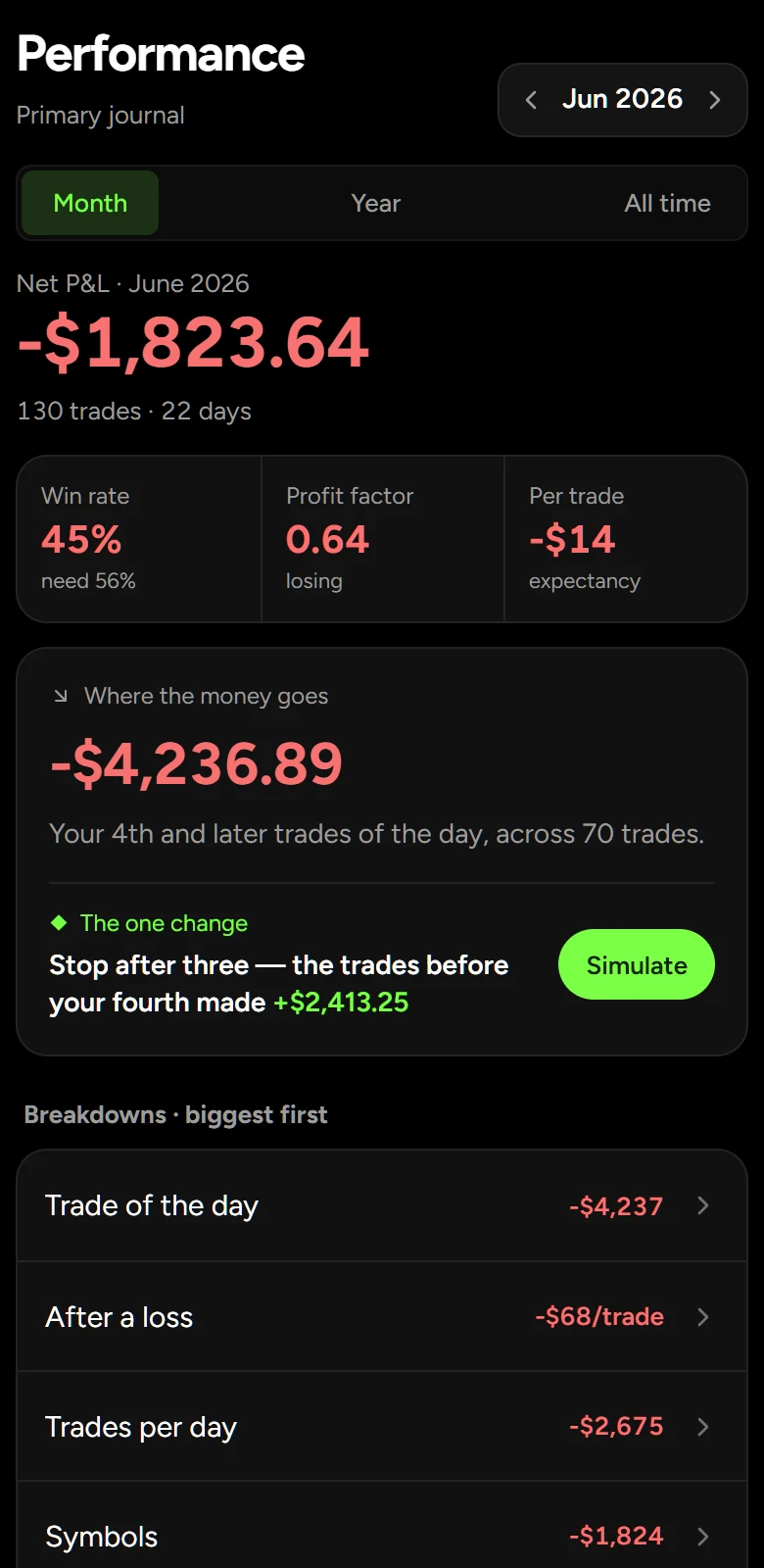
Where the money goes, where it comes from, and the one change that would have made the biggest difference.
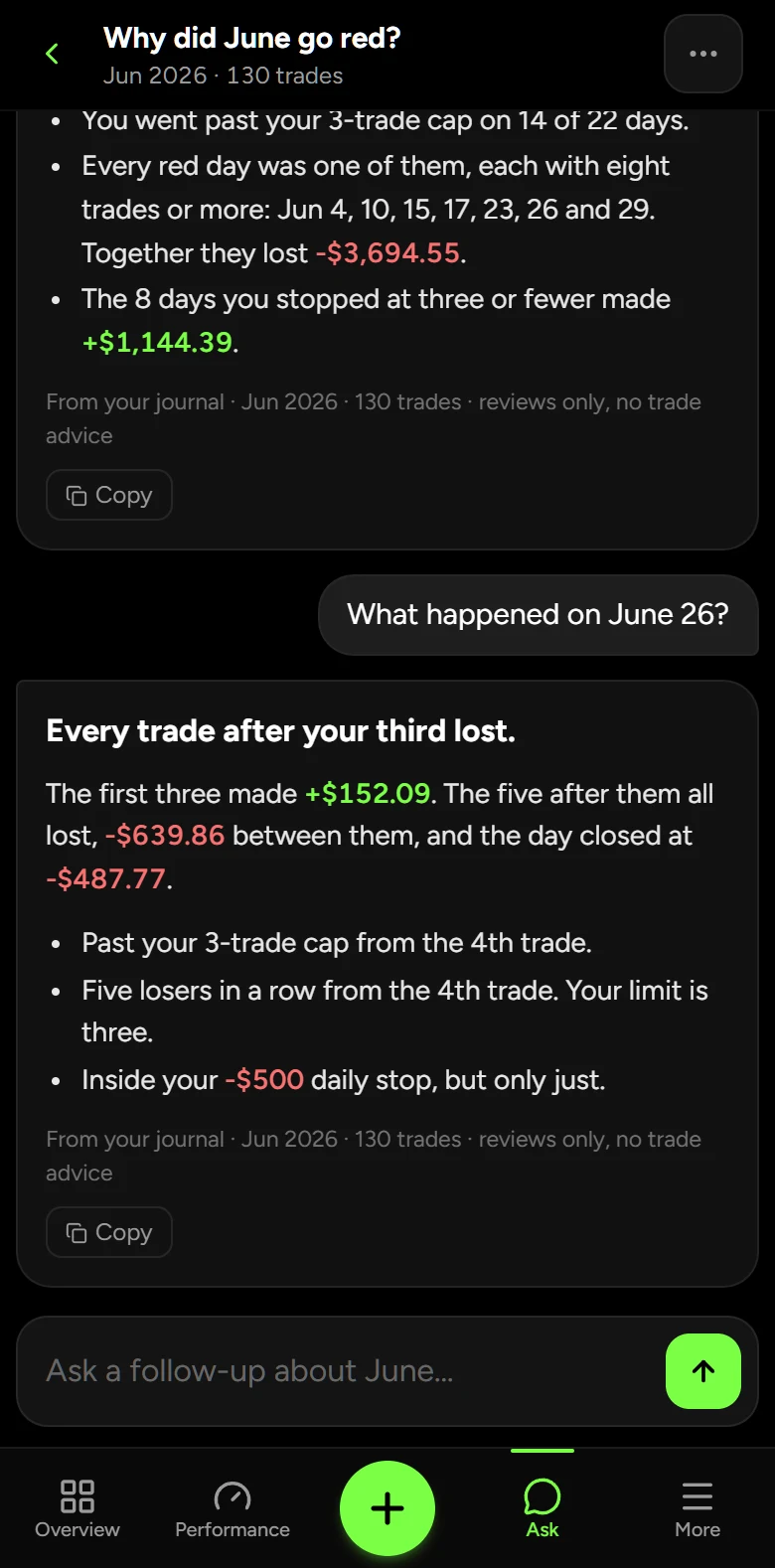
Ask why a month went red. It answers from your own figures, and it never tells you what to trade next.
The running total after each trade, and where your cap was passed.

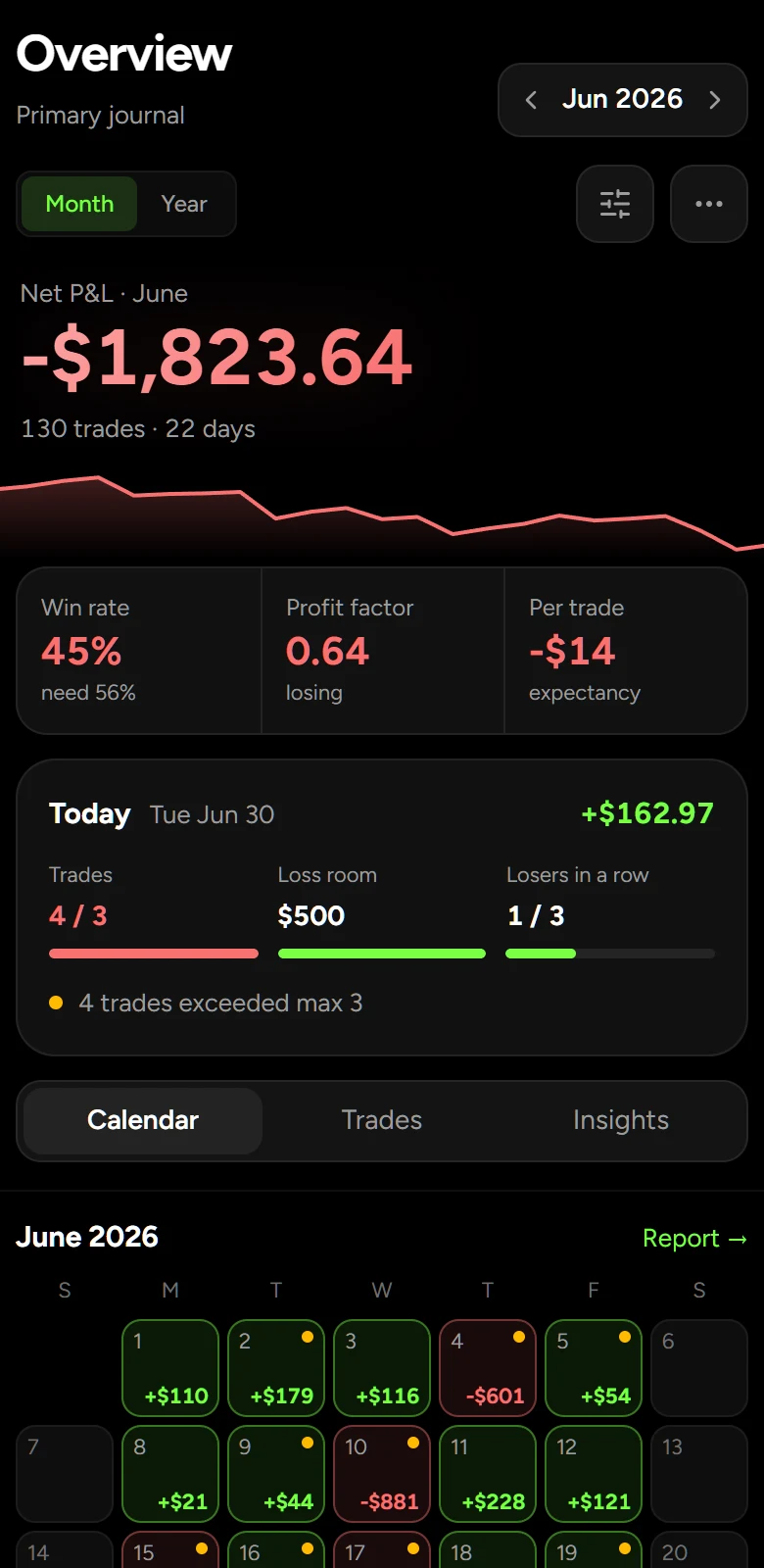
Green and red days, week totals, and a dot on every day you broke a rule.

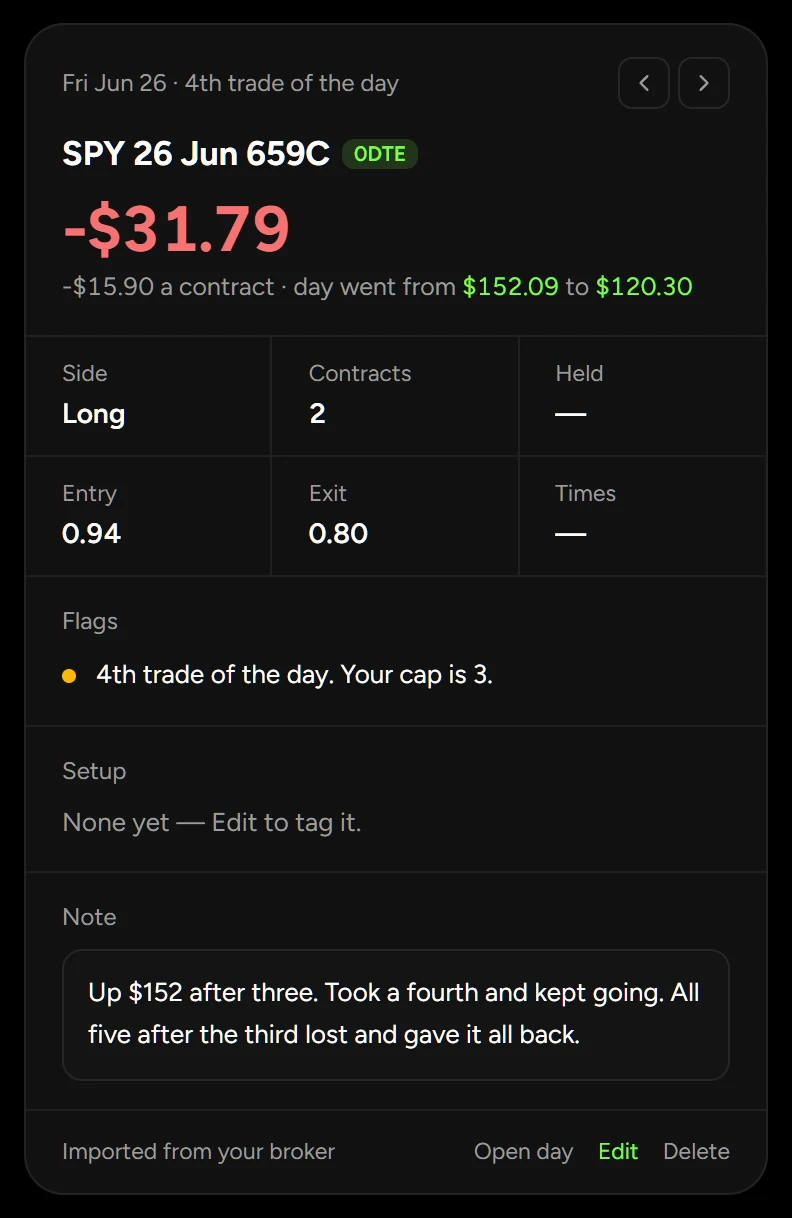
Where it sat in its day, what the day did after it, and the rule it broke.
Replay your own month with a trade cap and see what it would have kept.
Same journal, same login.
3Fix
The rule was three trades a day. Eight were taken. Scroll to watch the day the way the journal shows it.
Trades 1 to 3
After the 3rd trade the day stands at +$152.09, which is where the rule says to stop.
Trades 4 and 5
Two losers take the day to -$41.86. The journal marks every trade after the 3rd, so you can see where the line was crossed.
Trades 6 to 8
None of them wins back what the last two lost. The day ends at -$487.77.
The verdict
The trades after the cap cost $639.86. The journal does this sum for every day, and the rule simulator does it for the month: June ended at -$1,823.64, and stopped at three a day it would have made +$2,413.25.
New on Diamond
Open a day you traded and it plays back one minute at a time, with your trades on the chart. Take the trade again, mark your levels, add indicators, and test a rule on the day.
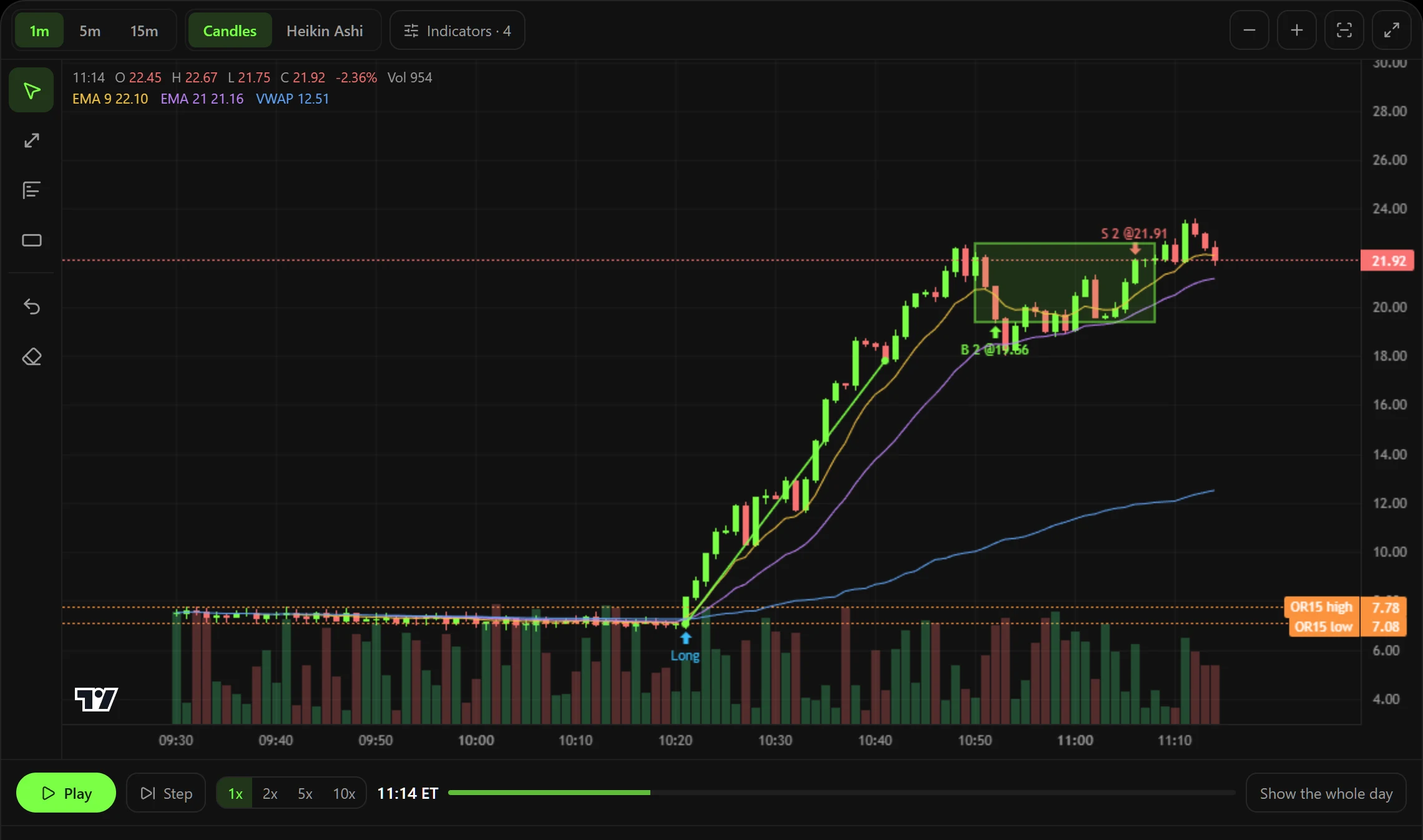
The contracts you traded and the stock under them. When your broker sends no fill time, the candles your price traded through are shaded as an estimate.
Buy and sell as it plays. Practice orders fill at the close of the candle on screen and never touch your journal.
Run a rule like an opening range breakout over only the candles you have seen, with its net and its worst drawdown.
Shown on a sample session. One-minute data from OPRA and the US stock exchanges, available the trading day after.
Real figures from the founder's own year, split by how many trades he took in a day.
lost per day, on average.
made per day, on average.
Open trendchasers.net on your phone and add it to your Home Screen, and it opens like an app. The same journal on your phone and your desktop, with nothing to move over.
Every plan keeps a full journal. Paid plans add broker sync and the analysis built on it, and checkout takes your card but charges nothing until the trial ends.
Every paid plan starts with a 7-day free trial, one per person. Yearly saves 2 months.
Log trades by hand and keep the full journal.
$0
No card needed.
Connect a broker and stop typing trades in.
$9/month
Free for 7 days, then $9 a month. Cancel any time before then and you pay nothing.
Ten brokers, and an assistant that reads your stats.
$19/month
Free for 7 days, then $19 a month. Cancel any time before then and you pay nothing.
Everything, with room to actually use it.
$39/month
Free for 7 days, then $39 a month. Cancel any time before then and you pay nothing.
One-tap trade import for 20 brokers is now live — read-only, so Trend Chasers never sees your balance or places trades on your behalf.
Why a free trading journal helps you track performance, review mistakes, and improve consistency — logging by hand free, or broker sync from $9 a month.
Connect any of 20 brokers and pull your trades in whenever you want them — how the connection works, what data it reads, and how to disconnect.
Review performance day by day on a color-coded calendar. See winning streaks, red days, and monthly net P&L at a glance.
Straight answers on broker sync, pricing, and where your trades are kept.
No. Connecting a broker is entirely optional — you can log every trade manually and never connect anything.
Trend Chasers uses SnapTrade, a broker-data connection provider, to pull your trade history. Your login goes to your broker or SnapTrade's secure portal, never to Trend Chasers' servers. Connections are read-only, and you can disconnect anytime from the app.
20 brokers support one-tap import, including Thinkorswim, Charles Schwab, Robinhood, Webull, Fidelity, E*TRADE, and more — see the full list on the Brokers page. Manual entry works for any broker.
Manual entry works with any broker today. One-tap import arrives as SnapTrade adds brokerages; if you have an account, open a support ticket in the app and tell us which one you use.
Yes. The journal is built mobile-first — log trades, connect a broker, and review your calendar from your phone. Use Add to Home Screen to install it like an app.
Yes. Broker sync captures strikes and expirations for options where the brokerage provides them. Manual entry supports stocks, options, futures, forex, and crypto with per-trade tags and notes.
Without an account, your journal never leaves your browser. With an account, trades sync encrypted in transit and only your login can read them. If you connect a broker, your credentials are never stored by Trend Chasers — SnapTrade handles the connection.
The journal is: unlimited manual logging, the P&L calendar, dashboard stats, notes, tags, trade grading and the year-end export for your accountant, with no trade limit and no credit card. What costs money is the automation — broker sync, the performance screen, the rule simulator, a publishable verified track record, the AI assistant, market replay, automatic daily imports, coach comments, risk-rule alerts, the weekly AI review, a combined view of all your journals, and the monthly PDF report are on paid plans, from $9 a month, because every brokerage connection carries a monthly fee we pay whether you sync once or a hundred times.
Still have a question?
Email support@trendchasers.net and ask us about your setup.
Start a free journal in a minute. Connect your broker when you're ready, and try it free for 7 days.